Get started
Add the bot, connect your clan, and scout your next opponent.
1. Add the bot
You need the Manage Server permission in Discord. Add Clan Fortify, choose your server, and keep the requested permissions on. The bot needs to see the channel, send messages, embed links and use slash commands.
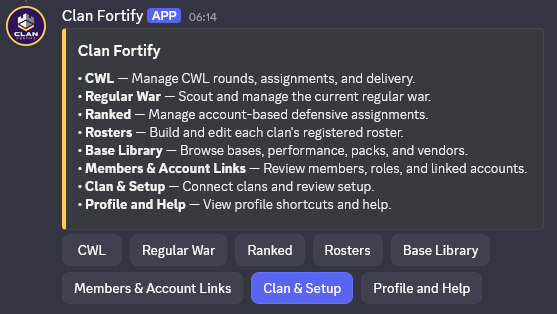
/fortify is your starting point.2. Link your Clash account
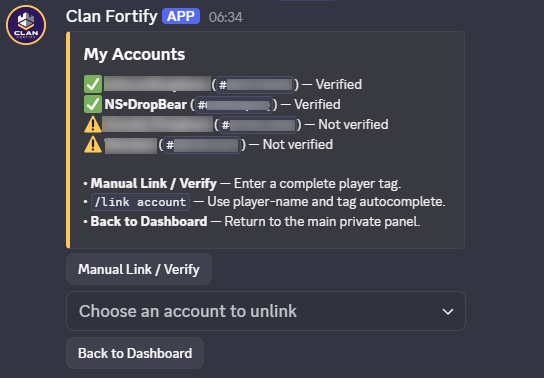
To add a clan you must be its Leader or Co-leader in the game. Run /fortify → My Accounts and link your account with your in-game API token.
3. Connect your clan
- Run
/fortify. Only you see the panel that opens. - Choose Clan & Setup, then Quick Setup Family, and fill in the form. You become the Owner.
- Choose Add Clan, enter your clan tag and confirm it's the right clan.
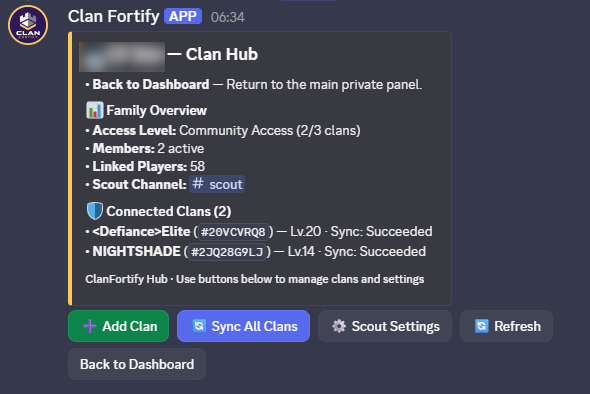
Running more than one clan? Add each one the same way. Use Sync All Clans after your rosters change.
4. Scout your first opponent
Run /scout roster and pick Regular War or CWL. For automatic posts at the start of each round, open /fortify → Clan & Setup → Scout Settings, choose a channel and a scope. The bot then posts at the start of each war or CWL round. More on scouting.
5. Link your members (optional)
Only needed for base assignments. Members open /fortify → My Accounts to link their Clash account. Leaders can link accounts for others in Members & Account Links.
/fortify shows your clan under Clan & Setup and /scout roster returns a report.