
Scouting
See which armies an enemy roster has used lately, then pick bases to counter them.
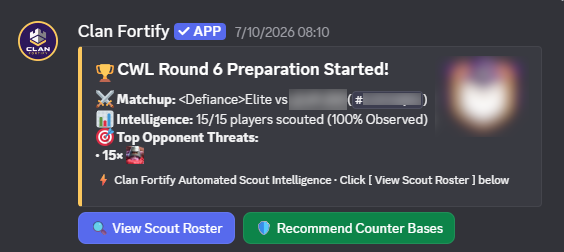
Scout a roster
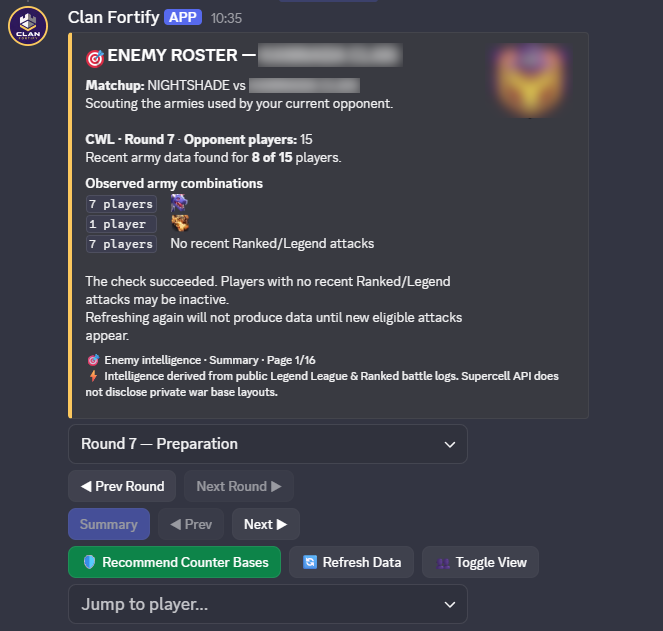
- Run
/scout roster. - Pick Regular War, CWL or a clan. For CWL you can also pick the round.
- Use the Prev and Next buttons and the player menu to move around. Summary and Toggle View change how much detail you see.
- Press Refresh Data if you want the newest battles.
- Press Recommend Counter Bases to see matching bases from your library.

Scout one player
Run /scout player with the player's tag.

Automatic posts
Open /fortify → Clan & Setup → Scout Settings and choose the channel. Check the bot can post there (View Channel, Send Messages, Embed Links). The post and the full report use the same data.
What the data means
Scouting uses public Ranked and Legend League battles. It shows armies the player has used, not what they will use. A player with no recent battles shows as unobserved, and the bot doesn't guess.
Result You can see the enemy's most common armies, check any player, and go straight to counter bases.